Track what you drink, or count the days you don't. Switch between the two with a swipe, whenever your goal changes.
iPhone & Apple Watch · 🤖 Android
*Complete drink logging, Sober Mode and history tracking on free tier. Premium unlocks advanced features and customizations.
** All images and screenshots on this website are for reference only. App design, layout, and functionality may differ.
A night of tracking, a swipe into Sober Mode, and everything in between, on iPhone and Apple Watch.
Plays from YouTube. Watch on YouTube

AlcoLog turns vague intentions into honest numbers. It helps people see their drinking clearly and make conscious choices, grounded in evidence and without harvesting their data. As both a pharmacist and a physician, that is exactly why I am happy to recommend this app to my patients who are looking to monitor their alcohol use.
Licensed Pharmacist & Medical Doctor · Manila
Featured on & partners



AlcoLog is not a medical device and does not provide medical advice.





For cutting back and staying in control. Log every drink in a tap, see units, calories and cost add up live, and find out what your habits really look like.
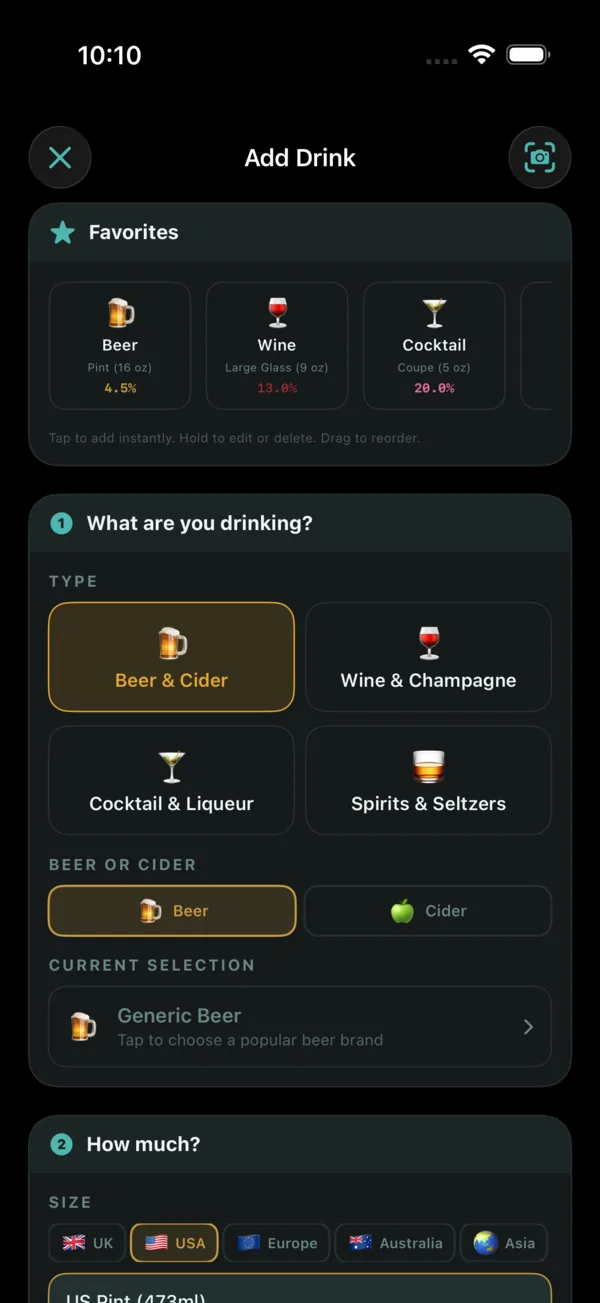
One tap starts a session. Your live timer begins counting, and from there you can log any drink with a few taps. Beer, cider, wine, cocktails, spirits, seltzers, liqueurs, mocktails, or water. Pick from 1,174 branded drinks and 92 pre-built sizes across 8 regions, or save favorites[1] for one-tap logging next time. Every drink is automatically calculated for units, calories, and cost based on real ABV data. Adding a night after the fact? Scan the bar or restaurant receipt[1] and AlcoLog reads the drinks off it and adds the whole round in one go.
Motivational notes you write yourself appear during your session to keep you grounded. A collection of curated quotes keeps things fresh. Your alerts track progress against the limits you set. A carefully tuned haptic system provides tactile feedback for every interaction, from logging a drink to hitting a limit, making the experience feel responsive and alive in your hand. And when you're done, end your session and see the full breakdown. No calendar-day cut-offs. Your session is your session, whether it starts at 7 PM or runs past midnight. And if you forgot to log a night entirely, add it afterwards: a past session gets the same timeline, the same totals, and the same AlcoScore treatment as one logged live, so your history stays accurate even when your memory does not.
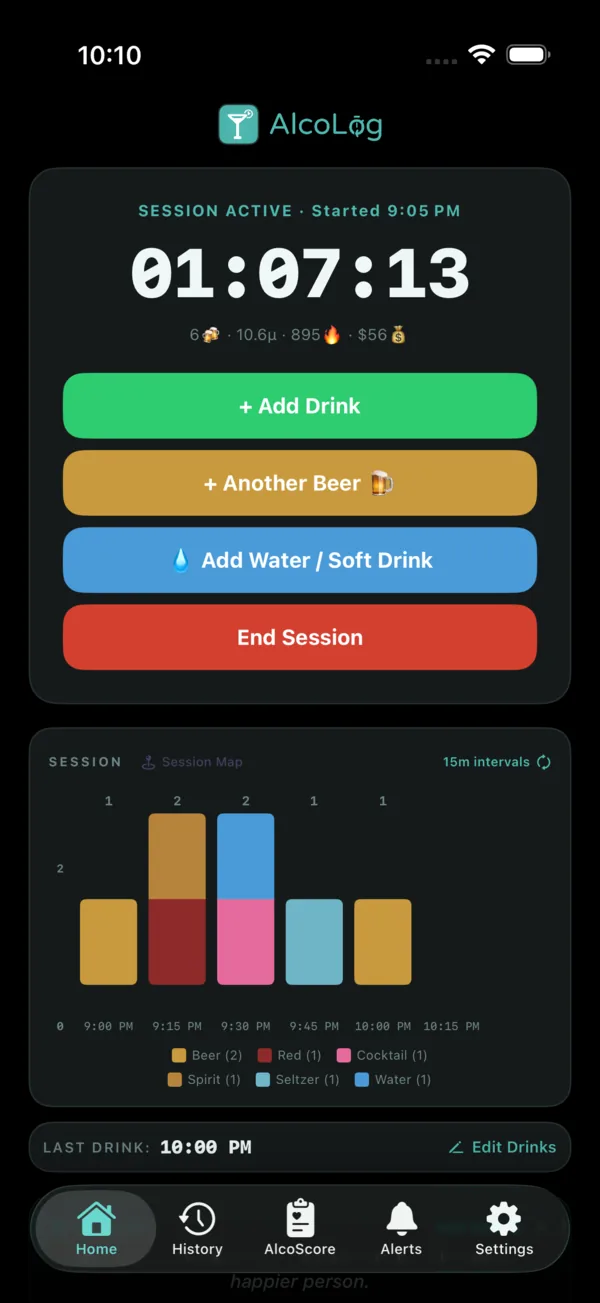
Pick from a built-in library of 1,174 drinks & brands, 92 region-aware size presets, and 8 regions. 596 beers & ciders, 441 spirits & hard seltzers, 44 wine varietals, 93 liqueurs, and 44 cocktail & mocktail recipes, plus 65 alcohol-free options so the app is fully usable sober. Regional size coverage spans UK pints, US ounces, AU schooners, EU standards, India pegs, PH Red Horse litros, champagne flutes, and more, with your detected region surfaced first.
Every pick pre-fills an accurate ABV and calorie profile for what you're actually drinking, not a generic estimate. Prefer something off-list? Use the barcode scanner[1] to pull data straight from the label, scan a bar or restaurant receipt[1] to add a whole round to a past session, point the camera at the drinks menu[1] to read a drink and the price that venue charges, snap a photo to identify a drink on-device with Apple Vision, or enter custom ABV, calories, and cost manually for any drink. Every field on the Add Drink screen is always yours to override, so your brand, your pour, and your numbers always win.
First launch asks one question that shapes the rest of your experience: what brings you here? Pick from five goal types. Cut back from where you are. Stay under a regional weekly limit. Build dry days into your week. Quit entirely, which switches AlcoLog to Sober Mode. Or just track, no goal pressure at all.
Your choice becomes the Your Goal card on your AlcoScore screen. The card morphs based on your goal type, showing weekly progress on the other goals, a "DAY" count with your start date on the quit goal, and celebration cards when you hit a milestone. The achievement card appears after four consecutive weeks under your cap, or four weeks at your dry-day target on Build sober days. Quit-goal milestones land at Day 7, 14, 30, 60, 90, 180, 365, and 730.
The goal lives alongside AlcoScore as a parallel surface, never as a seventh pillar. Changing your goal, hitting a target, or having a slip never moves your AlcoScore. You can switch goal types or adjust your target at any time from the app settings screen. Your Goal never shows negativity, and every goal update is forward-looking without ever shaming.
AlcoScore is a 0-100 health score that analyzes your drinking across six weighted pillars. It looks at how often you drink, how much, your pacing, your week-over-week trends, how well you stick to your own limits, and how much recovery time you give your body between sessions.
The score updates with every session using a rolling 28-day window, so it always reflects where you are right now. After each session, you get Proud Points celebrating what went well and Pinch Points highlighting what to watch. Across all your sessions, Helpers and Harmers give you the full picture of what's driving your score up or pulling it down.
The dedicated AlcoScore screen inside the app displays a gorgeous breathing glow animation that pulses around the dial, faster when your score needs attention, slower when you're in great shape. It's a subtle but constant reminder that your score is alive and responsive to every choice you make.

Most tracking apps stop at logging. AlcoLog goes further with a fully configurable alert system that keeps you informed without being intrusive. Set personal thresholds for units, calories, cost, and drink count, and get notified the moment you approach or cross them. Limits automatically raise by a percentage you choose after each alert, so they grow with your habits instead of feeling rigid. Every alert is one more thread keeping you conscious of the moment, not reading about it the morning after.
Location-based triggers can automatically start a session when you arrive at a saved venue and end it when you leave. Hydration reminders nudge you to drink water after a set number of drinks or a time interval. Motivational notes surface on a schedule you control. And if you are following a medication protocol, AlcoLog integrates dose logging, redose timers, and location-aware reminders directly into the alert flow. Every alert is optional, every threshold is yours to set, and nothing is ever preachy.
Every session you log becomes part of a rich, interactive history. A color-coded calendar heatmap reveals your drinking patterns at a glance, with intensity shading so you can spot heavy days, light days, and dry streaks without reading a single number. Swipe between months, tap any day to jump straight to that session, and scroll a horizontal monthly overview that tracks sessions, drinks, units, calories, and cost across your entire timeline.
Each session card expands to show a stacked timeline chart that breaks down exactly what you drank and when, with color-coded bars for beer, wine, cocktails, spirits, and water. A summary bar displays total units, drinks, calories, cost, and duration at a glance. Edit or delete individual drinks, tap and hold a session to delete it, and export everything as CSV or PDF[1] for personal records or to share with a healthcare provider. And AlcoScore Insights (AI), coming in November 2026, will analyze your patterns over time and surface personalized recommendations to help you build healthier habits.
Every time you start a session, AlcoLog surfaces a quote or a motivational note to ground you before your first drink. A curated collection of 31 quotes from authors, philosophers, and thinkers rotates through your sessions, and a special golden quote waits to be discovered. Show or hide any quote to curate the pool that feels right for you.
Motivational notes are different. These are words you write yourself, in your own voice, for your own reasons. Up to 10 note slots are available depending on your tier. Each note can be shown, hidden, edited, or deleted at any time. They appear alongside quotes when you begin a session, serving as a personal reminder of why you are tracking in the first place. Your notes can also appear in home screen and lock screen widgets, keeping your motivation visible throughout the day and reminding you to log and track your sessions.
When a session is running, AlcoLog stays with you through the Dynamic Island and Lock Screen Live Activity. Your units, drinks, calories, and cost update in real time without opening the app. The compact Dynamic Island shows the app icon and your chosen metric at a glance, and a long press expands it to reveal a full session dashboard with the live timer, drink breakdowns, water reminders, and log reminders.
The Lock Screen Live Activity mirrors the same data so you can check your session stats from a locked phone. Water reminder progress bars track how long until your next reminder, and log reminder countdowns keep you on pace. Every stat updates live as you add drinks. No need to unlock, no need to open the app. Your session is always one glance away.
 AlcoLog
🤖 Android only. BAC Estimation is available on Android. It is not available on iPhone.
During a session, AlcoLog shows an estimated Blood Alcohol Content based on your logged drinks, body weight, and biological sex, computed on your device with the Widmark formula. It updates live on your Home screen and rises and falls as the session unfolds, so you can stay aware of where you are.
Set an optional alert and AlcoLog will let you know when your estimate crosses a number you choose. It is a personal-awareness estimate, not a measurement, and real blood alcohol depends on many things the app cannot know. Estimate only. Don't drive.

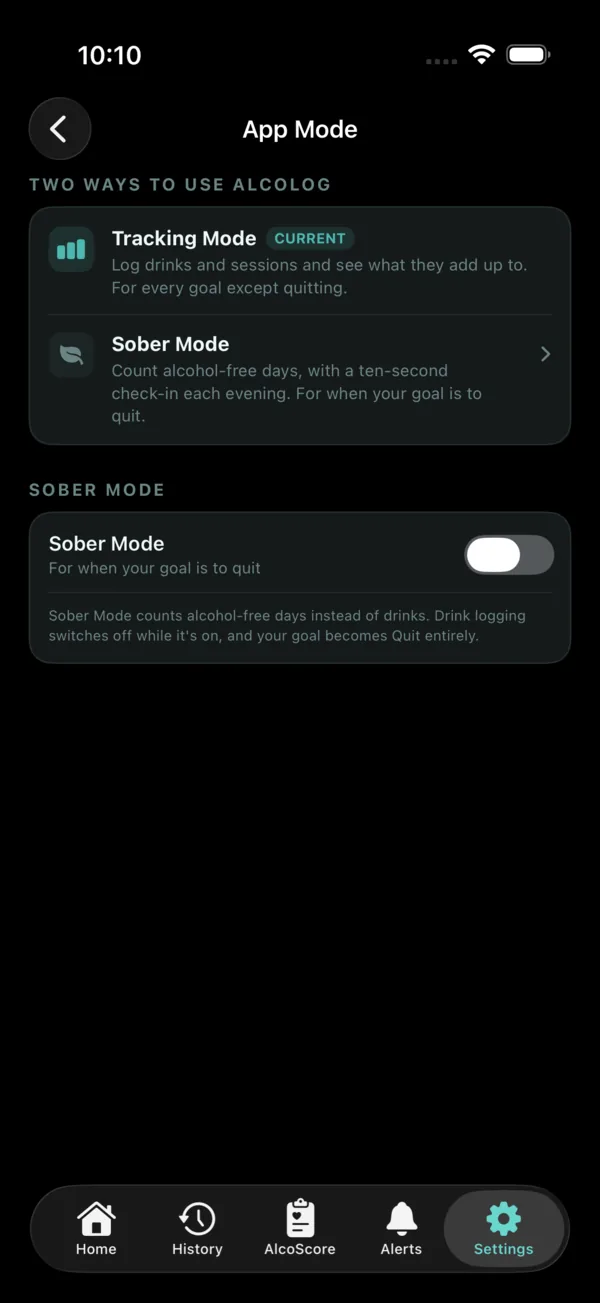
When the goal is to stop rather than cut back, switch modes and AlcoLog counts alcohol-free days instead of drinks. It lives in the same app, and your history comes with you both ways.
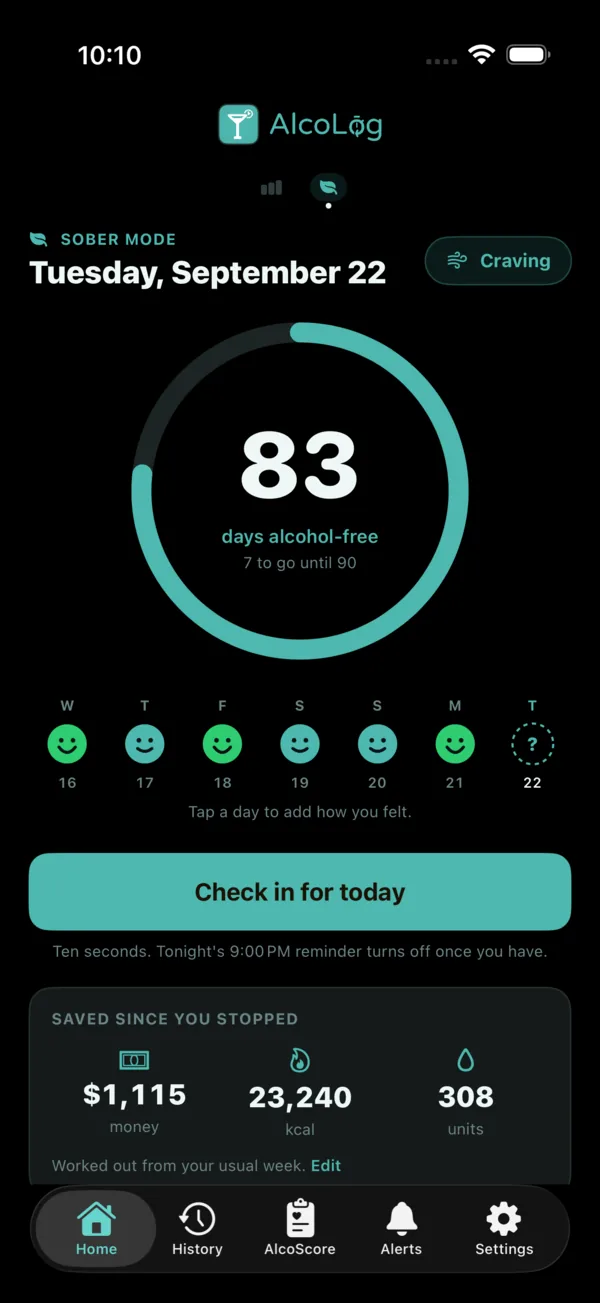
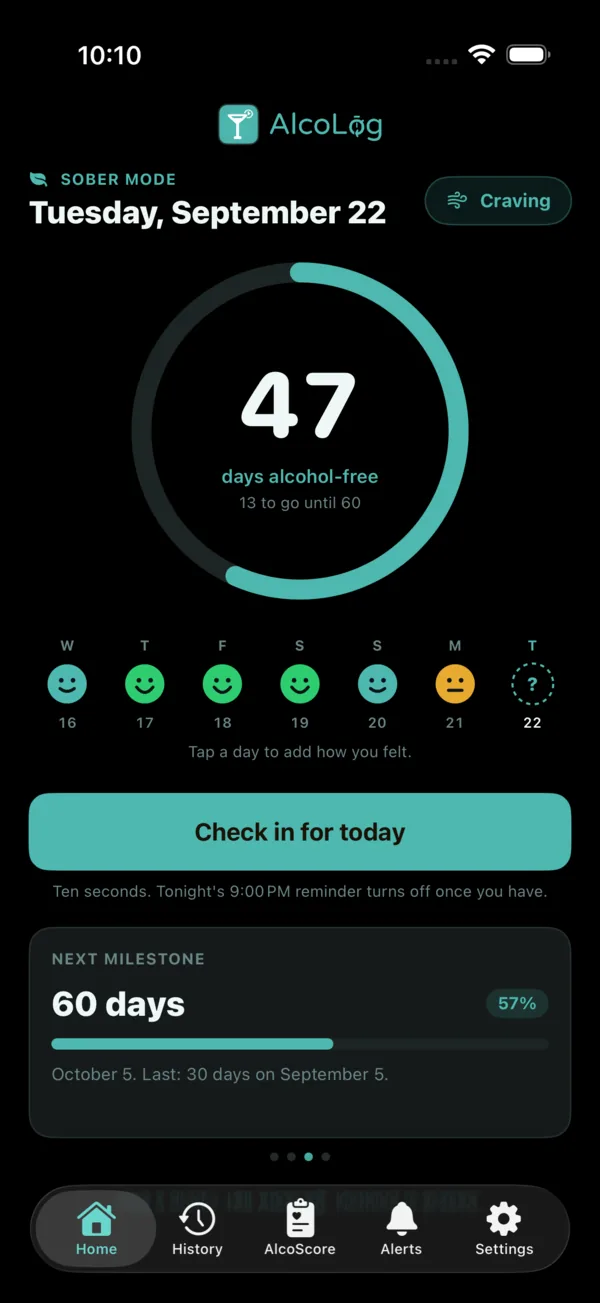
In Sober Mode, Home becomes a count of your alcohol-free days. A ring fills toward your next milestone, and your last seven days sit underneath, each one showing how you felt. Tell AlcoLog when your last drink was and it counts from the day after.
The motivational notes you write yourself still appear on Home, so the reason you started is never more than a glance away.
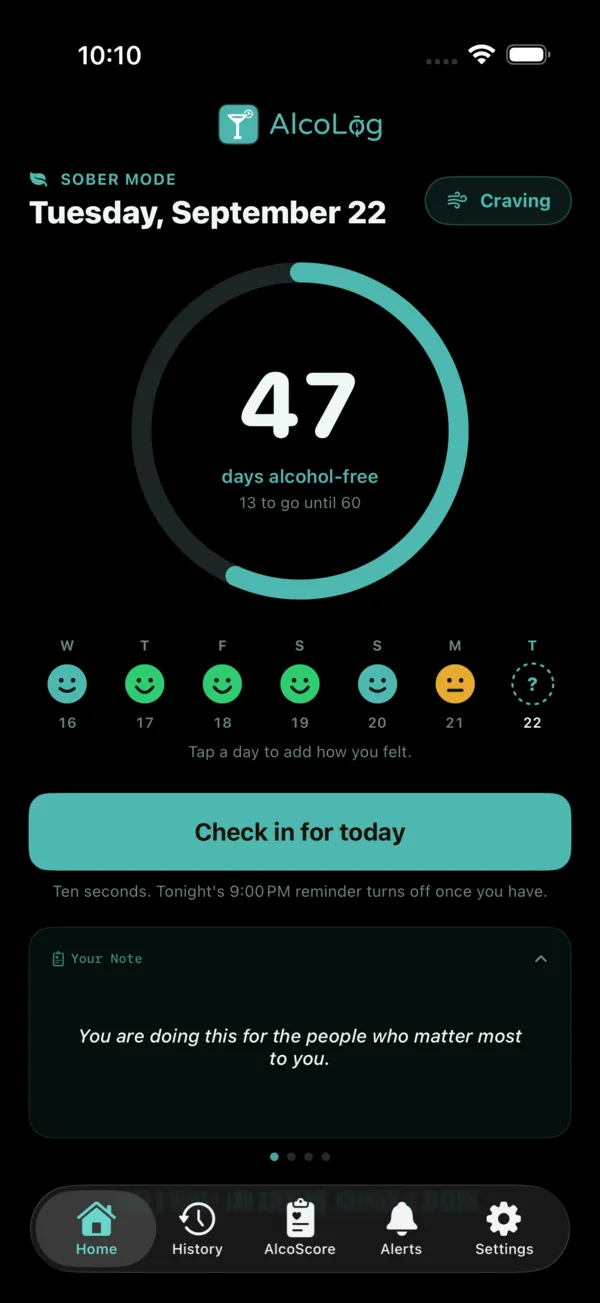
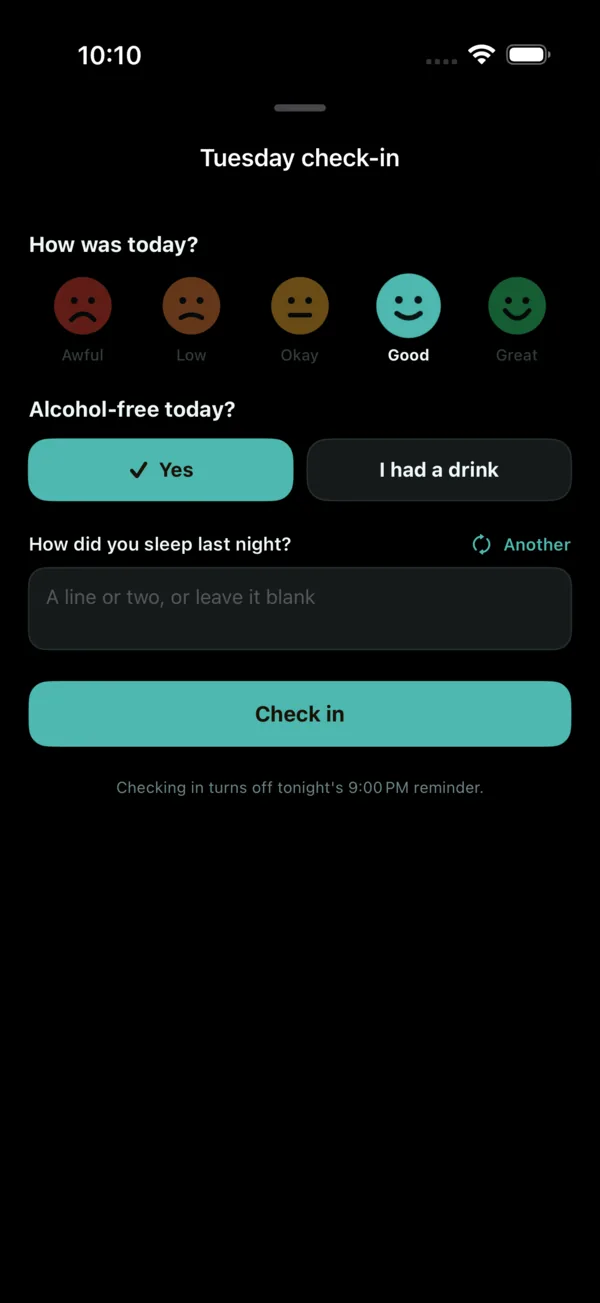
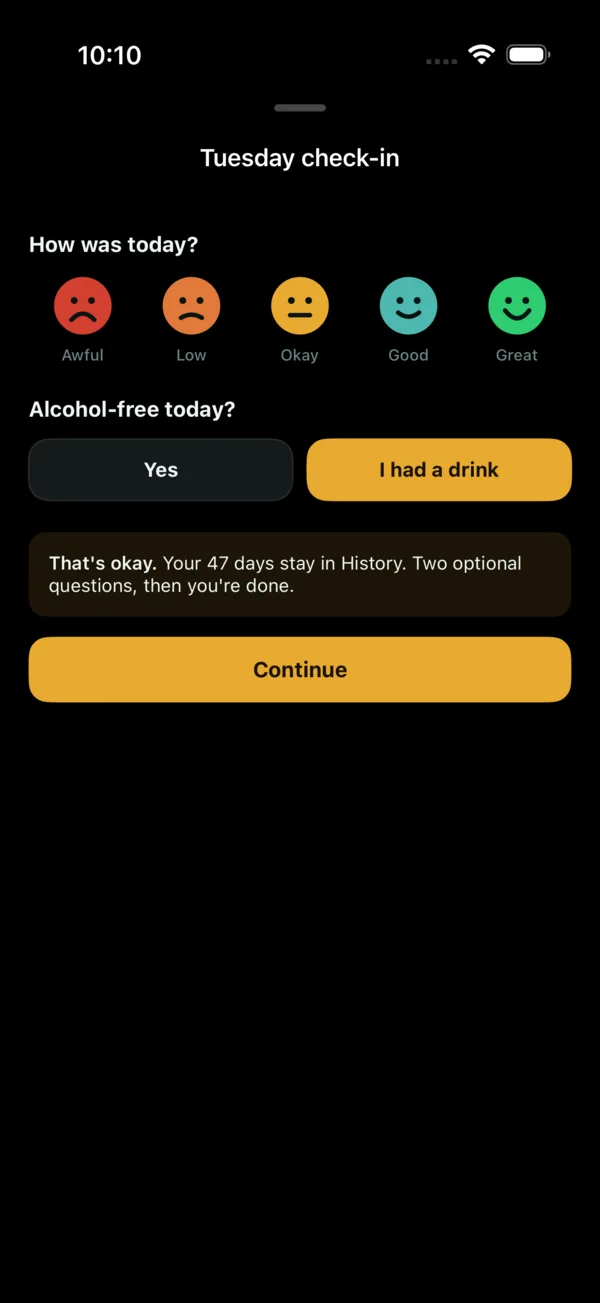
How was today? Alcohol-free today? How did you sleep? One tap for each, a line of your own if you want one, and you're done. Checking in turns off that evening's reminder.
Each answer colors that day on your week, so a run of good days (and the hard ones) is easy to see. Tap any day in History to see its check-in, the cravings you rode out and the day's notes in one place.
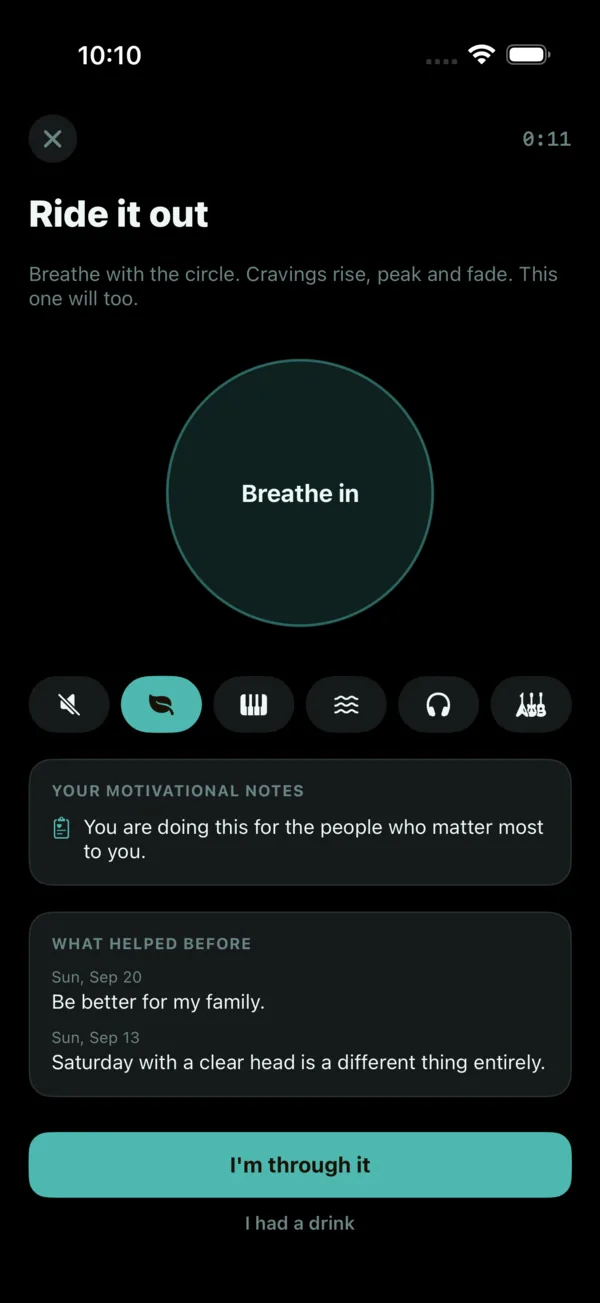
A Craving button sits at the top of the Sober home. It opens a breathing circle you can follow with your eyes or feel through the haptics, with five music loops to choose from, or silence.
Underneath are your own motivational notes and, from earlier check-ins, what helped you before. When it passes, one tap records that you got through it.
AlcoLog works out your usual week of drinking and keeps a running total of the money, calories and units you have not spent since you stopped. You can edit your usual week at any time.
Your next milestone is always on Home, with the days to go and how far you've come. Reach one and AlcoLog marks it with a celebration card, and your best runs are kept as sober-streak trophies in History.
Had a drink? Tell AlcoLog. Your alcohol-free days stay in your History, two optional questions follow, and you carry on. No judgment, just an honest record.
Swipe the Home screen to move into Sober Mode, or pick it under Settings > App Mode. Choosing to quit as your goal at setup turns it on for you.
Swipe back the same way to turn it off: drink logging returns straight away, and everything you logged in either mode stays in your History.
The full AlcoLog experience on your wrist, on Apple Watch and on Wear OS[1]. Start and end sessions, log drinks from your quick drink favorites, track medications with redose timers, check your AlcoScore with animated breathing dial, and configure all your alerts. Everything syncs bidirectionally with your iPhone in real time, so your data is always up to date on both devices.
Your watch face becomes a live dashboard with 16 complications and 3 controls. Circular complications show session units, drinks, calories, and cost with a green timer arc that tracks your session duration. Corner complications show the same stats along the edge of the watch face, with this week's totals between sessions. A rectangular complication displays a full session summary, and an inline complication fits your stats into a single text line. Control widgets let you start or end a session, add water, or add another of your last drink, all without opening the app.
While Sober Mode is on, your Watch shows these screens in place of session tracking: your alcohol-free days, your last seven days, and Craving and Notes buttons, plus everything you have saved since you stopped.
Four Sober complications put the day count on your watch face: a circular ring to your next milestone, a corner gauge, your week, and a single inline line.
5 circular + 5 corner + rectangular + inline + 3 controls
Watch Screenshots & Complications shown on this website are approximate renderings only. Actual Watch App and Complications look more polished with extended functionality.
Over 30 widgets across every size. Session stats, AlcoScore, quick-add, favorites, cost breakdowns and insights, plus three Sober Mode widgets for your alcohol-free days.
Widgets shown on this website are approximate renderings only. Actual Widgets look more polished with extended functionality.
If your routine includes medication related to alcohol use, AlcoLog gives you a simple way to log each dose alongside your drinking sessions. The app supports 7 common medications and a supplements category. Tap to log, and AlcoLog timestamps the entry automatically. There is no clinical guidance, no dosage recommendations, and no medical advice of any kind. It is a logbook, nothing more.
Redose timers let you set a reminder for your next dose so you do not have to keep track manually. Location-based reminders can notify you when you arrive at a saved venue, so logging becomes part of your routine rather than something you have to remember. Every medication entry is stored privately with your session history, never on our servers. Exports cover your drinks and sessions, not your medication doses: if you are working with a healthcare provider, you can export your drinking history as CSV or PDF[1] to share during appointments.
AlcoLog's free tier gives you everything you need to start tracking, and all of Sober Mode. Premium unlocks deeper insights, more widgets, and the watch apps for Apple Watch and Wear OS.
Premium Monthly and Premium Yearly include a 14-day free trial for new subscribers. Lifetime products are one-time purchases and do not include a trial. Prices shown in USD. Local currency may vary.
Free to download. No account required. No subscription ever for standard use.
Tap any screenshot to enlarge
Tap any Apple Watch screenshot to enlarge